Posted on 2 Comments

New Embroidery Design Files and Freebies

While I love my Brother SE400, it didn’t take long for me to get bored with the built in embroidery designs. I found many cute designs online to buy. That helped, but  even that was somewhat limiting as my machine only has a 4×4 hoop capability. Besides, I’m a diy, hands-on person. Of course, that all led to learning how to digitize designs myself.  

The digitizing process is fun but time consuming. When I spend that much time on something, I want to share it with others. So, I am offering my embroidery designs in my shop under Embroidery Files and Freebies.  Each design is scaled to fit in a 4×4 hoop and come with the .CSD, .DST, .EXP, .HUS .JEF, .PCS, .PES .SHV, .VIP, or .XXX file types to work on most embroidery machines. New designs are listed for free for a limited time. 

You can find all of the above designs in my shop under Embroidery Files and Freebies. I would love to see what you create with the embroidery designs. If you’d like, share them here in the comments or on our social media channels. I also appreciate any feedback, especially if you have a different machine.

Tomorrow I should have a tutorial posted for using my Peppermint Candy design to create cute, in the hoop coasters. They’re an easy beginner project and make great gifts. You could also use a similar technique to create Christmas ornaments, or swap out the design in the middle to make them less seasonal.

Peppermint Candy Coaster almost complete
Sneak Peak of a Peppermint Candy Coaster in progress

If you’re not familiar with the term “in the hoop” it refers to an item that is completely or almost completely made by the embroidery machine in the hoop. I like in the hoop designs for things I’m making in sets because it’s easy to get nearly identical results. 

Posted on Leave a comment

Embroidery Machine Tips: Paw Patrol and Using My Brother SE-400

Thaddeus turns three next week! When asked what he wants for his birthday, he exclaims, “Paw Patrol stuuuuuufff!” He is also constantly asking me to sew basically the entire cast of Paw Patrol for him. I may be crafty, but that is a bit beyond my skill set. So, since I have a lovely embroidery machine that doesn’t get used nearly enough, I thought I’d purchase a Paw Patrol design set for my machine.

The set came from Etsy seller OhMyArtDesigns. It comes with all the main pups, Rider, Robo Dog, and the Paw Patrol Logo. They also come in a few different sizes and file types to accommodate different brands and machines. So far, I love the designs. The stitch density is great, and they have a lot of detail. The only problems I’ve had fall completely in the “user error” category.

Embroidery Color Charts Matter

My first mistake was using the thread colors displayed on the machine and my manual chart to choose my threads.

The thread colors and names used by different machine brands varies, so if a design is drafted using different colors than yours, the color suggestions can seem a bit off. I was in a hurry and didn’t pay attention to the color chart provided by the designer, so some of my color choices weren’t quite right.

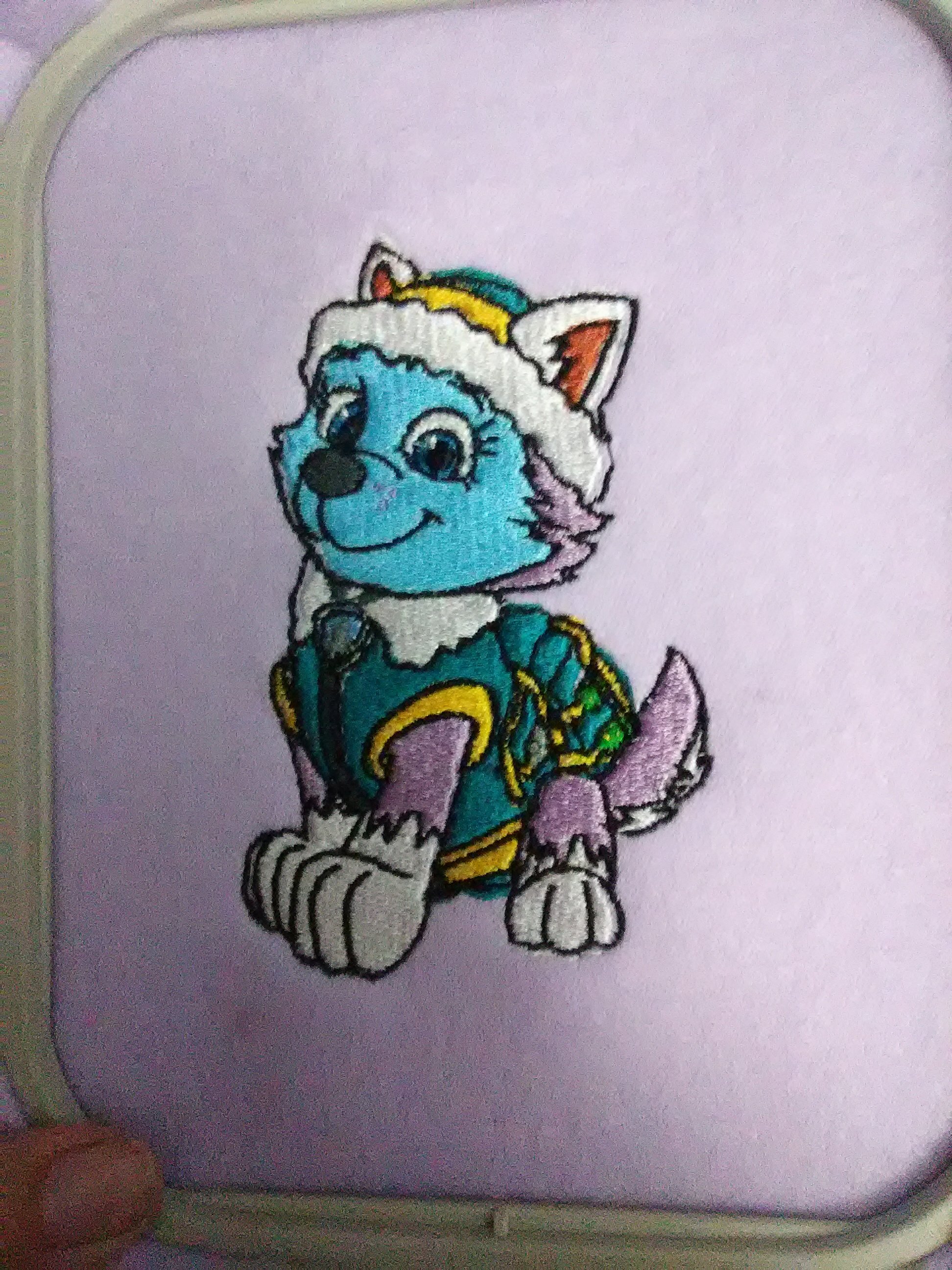
Everest would be less blue if I had used the appropriate chart. Lesson learned. This also highlights the need to test run any new patterns before stitching them on your final product. Embroidery machine stitching is so dense that it’s almost impossible to remove without ruining the fabric.

Hoop Tightly

The other problem I encountered is also easily fixed. I just need to learn how to hoop my fabric properly. If you look closely, you can see the black outline on both Everest and Rider strays from the edge of the design on one side. I still have trouble getting the fabric and stabilizer drum-taut, so by the time the outline is stitched, the design stitches puckered the fabric in places. I have a magnetic hoop set on my wish list to see if that would help, but honestly it’s probably a case of needing more practice. Considering how many pups I have left to stitch, I may be an expert at hooping by the end of the week!

Rider in embroidery.

It is so fun to watch the designs being sewn. It’s like putting together a puzzle.

Embroidery. Everest after embroidering the first color.
Everest after stitching the first color.

Looking for new designs to try on your embroidery machine? Find my embroidery files and freebies here.

To stay informed about new posts, products and sales, sign up for my newsletter here.

Tips for successful machine embroidery.


Posted on Leave a comment

Children’s Messenger Bag

This morning I made a messenger bag using Merriment Design’s Kid-sized Messenger Bag Free Pattern and Sewing Tutorial. The size is also nice for a small messenger-style purse.

Her tutorial is awesome, so I’m just going to share the minor change I made. Instead of making a fabric strap, I used some webbing I had on hand. Not only did that save time, but it allowed me to make the whole thing with two fat quarters. You could also use a thick ribbon, upcycle an old belt or an old purse strap for the handle.

I like using a light colored fabric for the lining in most bags I make. It makes it easier to find whatever is inside.

The fabric is from a fat quarter bundle I found at Tuesday Morning. I always find fun things in their sewing and craft section.

Posted on 1 Comment

My New Toy

So, I got a new toy for my birthday:


Yay! Now impatient me with no time and a fear of leaving needles around accidentally in the baby’s reach can do embroidery too! It’s also a regular sewing machine. I’ve never sewn on a computerized machine before. I’ve never sewn on a sewing machine newer than from the early 1990s for that matter. Most sewing machines I’ve used have been older than me. Not that I don’t like old machines. You’ll have to pry my trusty metal mechanical Kenmore and back up Signature(s) from my cold hands.

It’s been fun learning how to use it. I also may or may not be a bit obsessive about switching off the power strip and then going back and unplugging it from the power strip and then making sure I’ve unplugged it again later, lest some random lightening storm attack my precious.

It’s a brother se400. I haven’t done much regular sewing with it yet, so I can’t do a full review. I can say that I worried a little about getting annoyed with all the threading and re-threading involved with a single needle embroidery machine. Brother took care of that by giving it the most amazing needle threader I’ve ever seen. I usually skip “automatic” threaders as I find them harder to use than just sticking the thread through the eye by hand. This one is some sort of magic. Seriously, if you were to stop over, I’d probably briefly introduce you to my family and then insist you come see me thread my sewing machine.

Aside from just playing, I’ve rescued a few shirts from (probably coffee) stains by embroidering things on them to hide the stains. Considering my clumsiness and love of coffee, that alone will probably help me get my money’s worth out of it.

I am looking for decent digitizing software so I can do things like embroider the SubEarthan Cottage logo and make traditional monograms a little easier. Embird seems to be the go-to, but it’s a little pricey. Stitch Era is more my price range, but I’m not sure it’s as user-friendly. I’ve also seen Sew What Pro mentioned, but haven’t looked into it enough to know what it’s like. Any advice on software would be appreciated.